We create New Activity in Android Studio to create XML file for designing UI and java file coding. Below are the steps to create new Activity in Android Studio:
Advertisement
How To Create New Activity in Android Studio:
Step 1: Firstly, click on app > res > layout > Right Click on layout. After that Select New > Activity and choose your Activity as per requirement. Here we choose Blank Activity as shown in figure below.
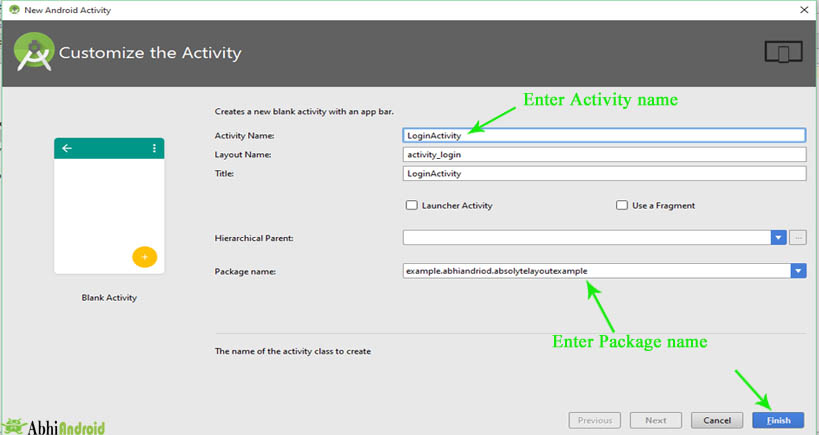
Step 2: After that Customize the Activity in Android Studio. Enter the “Activity Name” and “Package name” in the Text box and Click on Finish button.
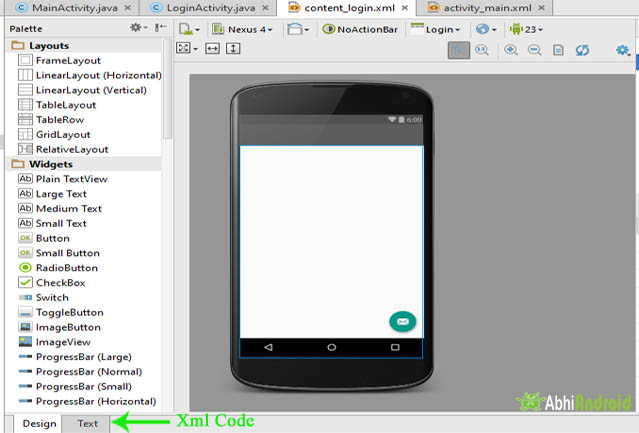
Step 3: After that your new Activity in Layout will be created. Your XML Code is in Text and your Design Output is in Design.

Really Nice one ,, Thanku