Adding audio clip to android application is a simple task as it also add some further functionality. Here is a step by step on how to play music when App will start.
Advertisement
Adding Audio to app in Android Studio:
Step 1:
Open the android studio with the project in which you want to add-on audio clip/media file.
Step 2: Create a raw folder.
Step 3: Add media file to raw folder by simply copy and paste that to raw folder.
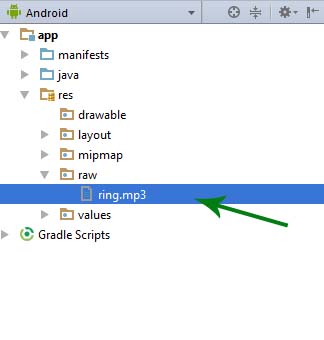
Step 4: Here we added a media file “ring.mp3” . Now open the Java File of desired activity, here we are adding audio in MainActivity.
Step 5: Further add this code
MediaPlayer ring= MediaPlayer.create(MainActivity.this,R.raw.ring);
        ring.start();
Step 6:
Advertisement
Now run the App and your music will play when App will start.
raw is which type of folder resource or assets or Adil or anything else?
It’s a resource folder which is created by Android Developer to store audio & video file. Please read https://abhiandroid.com/androidstudio/create-raw-folder-android-studio.html
I already add raw folder to my project with audio but when I build the program it shows error that cannot find symbol variable raw please help me
I don’t know where to put the code.
Into the onCreate method
how do i set it to replay on continuous loop?
how can I add multi mp3 and mp4 files in one activity plz
Hi, I did exactly what is written here but android studio says : it cannot resolve the work START which you have written on the second line : ring.start();
You have to put all of this in a function. And that function I’ve put on a ‘onClick’-event. It works just fine!
But i would like to play it when the activity starts. That’s my next step.
Bro i put every code you said n the build successful but when i open the app its doesn’t play the song
ok I will check it
hi everyone! can someone help me with my application development? here is my gmail account joyjoyyoj12@gmail.com. please message me I’ve got a lot of questions
can you tell how to create a button to start or stop the song?
Thanks Sir !! you solved my problem love you
hi everyone! can someone help me with my application development? here is my gmail account joyjoyyoj12@gmail.com. please message me I’ve got a lot of questions
Hi,pls i need your help.i created a setting activity where i have a switch which i intend to control my app background sound/music ,but i cant get the switch to control my sound.
Hello, I need to add additional options for sounds to my project. I’m using the android-Repeating Alarm from github.com. I’m just not sure how to go about it.
Thanks.
MediaPlayer sing= MediaPlayer.create(MainActivity.this,R.raw.ring);
sing.start();
raw cannot resolve
remove the MainActivity in the syntax
and line sing.start( );
it should be getApplicationContext() instead of this
I read this page and managed to do it. Thank you very much.